
Apple’s New iPadOS 27 Update Could Change How You Work Every Day
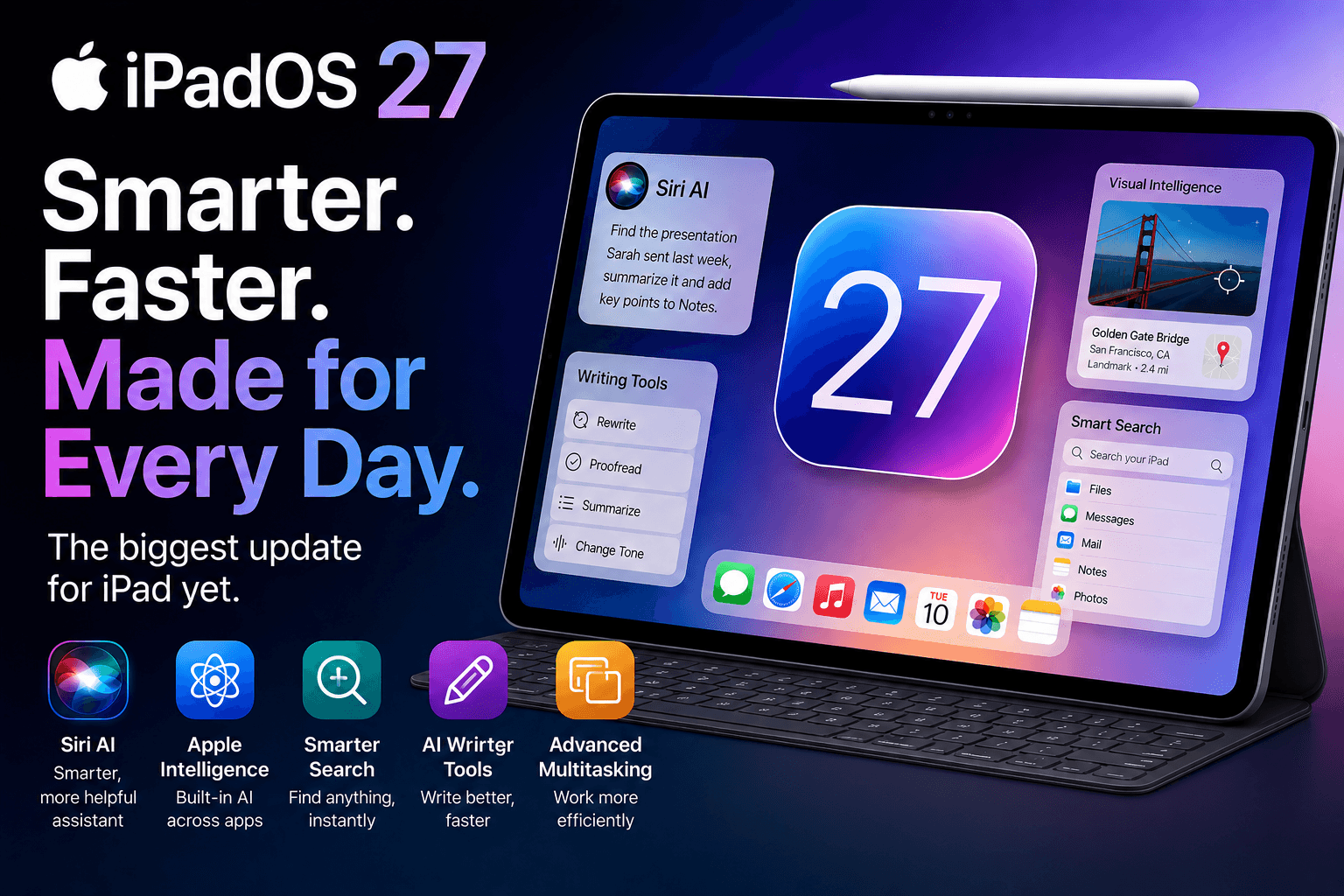
Apple Is Reimagining What the iPad Can Do
With the introduction of iPadOS 27 at WWDC 2026, Apple appears ready to take a major step forward. This isn't just another annual software update packed with minor improvements and visual tweaks. Instead, iPadOS 27 focuses on something much bigger: making the iPad smarter, more helpful, and more capable through artificial intelligence.
From a dramatically improved Siri AI experience to powerful Apple Intelligence features, smarter multitasking, AI-powered writing tools, and system-wide productivity enhancements, Apple is positioning the iPad as a device that can help users accomplish more with less effort.
Whether you're attending classes, managing a business, creating content, or simply using your iPad every day, iPadOS 27 introduces features that could fundamentally change how you interact with your device.
And for customers exploring the latest iPad lineup, updates like iPadOS 27 are a reminder that buying an iPad is no longer just about hardware. The software experience continues to evolve every year, which is why many Apple users choose trusted Apple Premium Partners like iVenus to stay updated on the newest devices, software capabilities, and Apple ecosystem innovations.
What Is iPadOS 27?
iPadOS 27 is Apple's latest operating system built specifically for iPad devices. Announced during WWDC 2026, the update focuses heavily on artificial intelligence, personalization, productivity, and deeper integration across Apple's ecosystem.
Unlike previous updates that often centered on interface changes, iPadOS 27 concentrates on improving how users work, communicate, create, and manage information.
Apple's goal is simple: reduce the time spent navigating apps and menus while increasing the amount of work users can complete naturally through intelligent assistance.
The result is an operating system that feels more proactive than reactive.
Siri AI Finally Becomes the Assistant Users Have Been Waiting For
Perhaps the biggest announcement in iPadOS 27 is the complete transformation of Siri.
For years, Siri has been useful for basic tasks such as setting alarms, checking the weather, or sending messages. However, competitors have pushed conversational AI much further.
Apple is now responding with an entirely new Siri AI experience.
The upgraded Siri understands context, remembers previous conversations, and can complete complex multi-step requests without requiring users to repeat themselves.
Imagine saying:
"Find the presentation Sarah emailed me last week, summarize the key points, and create a reminder for tomorrow's meeting."
Instead of requiring multiple commands, Siri can understand the entire workflow and complete it automatically.
This makes the assistant feel far more intelligent and genuinely useful for daily productivity.
What Siri AI Can Do
-
Understand personal context
-
Analyze on-screen content
-
Search files, emails, messages, and notes
-
Draft content automatically
-
Create reminders and schedules
-
Organize information
-
Complete actions across multiple apps
-
Maintain natural conversations
For many users, Siri AI alone may become the most important reason to upgrade to iPadOS 27.
A Dedicated Siri Workspace Changes Everything
Apple is also introducing a standalone Siri experience.
Rather than appearing as a temporary overlay, Siri now has its own dedicated workspace where conversations can continue over time.
Users can:
-
Review previous conversations
-
Continue unfinished requests
-
Access generated content
-
Manage tasks and recommendations
-
Search past interactions
This approach makes Siri feel less like a voice command system and more like a personal AI assistant available throughout the day.
On larger iPad displays, the dedicated interface takes full advantage of available screen space while remaining accessible during multitasking sessions.
Apple Intelligence Expands Across the Entire Operating System
Apple Intelligence is becoming the foundation of iPadOS 27.
Instead of existing as a separate feature, intelligence is woven throughout the operating system.
Users will notice AI assistance appearing naturally in everyday workflows across:
-
Notes
-
Mail
-
Messages
-
Safari
-
Calendar
-
Photos
-
Reminders
-
Shortcuts
The goal is to eliminate repetitive tasks and help users focus on what matters most.
Rather than forcing users to open a separate AI application, the intelligence is built directly into the apps they already use every day.
Writing Tools Become Smarter Than Ever
One of the most practical additions in iPadOS 27 is the next generation of writing assistance.
Whether you're drafting emails, preparing reports, creating presentations, or writing social media content, the new tools can help streamline the process.
AI-Powered Writing Features
Users can:
-
Rewrite text
-
Improve grammar
-
Change tone
-
Summarize long content
-
Generate first drafts
-
Expand existing ideas
-
Simplify complex language
For students, business professionals, marketers, and creators, these tools can save significant time throughout the day.
Visual Intelligence Turns the Camera Into a Powerful Assistant
Apple is also expanding Visual Intelligence capabilities.
The feature uses AI to understand what the camera sees and provide useful information instantly.
For example, users can:
Analyze Documents
Scan paperwork and automatically extract important information.
Understand Objects
Point the camera at products, devices, landmarks, or objects to learn more about them.
Process Receipts
Capture receipts and organize expenses more efficiently.
Extract Text
Convert printed information into editable digital content.
Visual Intelligence essentially transforms the iPad camera into a real-world search and productivity tool.
Smarter Search Makes Information Easier to Find
One of the most underrated improvements in iPadOS 27 is search.
Apple has significantly enhanced how search works throughout the operating system.
Instead of searching individual apps separately, users can find information across:
-
Files
-
Emails
-
Notes
-
Messages
-
Photos
-
Calendar events
-
Documents
Imagine trying to locate a project proposal from three weeks ago.
Rather than opening multiple apps manually, users can simply ask Siri or use universal search to find exactly what they're looking for.
For professionals dealing with large amounts of information, this feature could become indispensable.
Shortcuts Become More Intelligent
Apple's Shortcuts app has always been powerful, but it often required technical knowledge.
iPadOS 27 changes that.
Users can now create sophisticated automations using natural language.
For example:
"Save all meeting notes into a project folder and email them to my team every Friday."
The system can build much of the automation automatically.
This lowers the learning curve while making automation accessible to everyday users.
AI-Powered Photo Editing Arrives
The Photos app is receiving some of its most impressive upgrades in years.
Object Removal
Remove unwanted distractions from images with just a few taps.
Smart Reframing
Automatically improve composition and cropping.
Image Expansion
Generate additional image content beyond original photo boundaries.
Enhanced Editing Suggestions
Receive AI-powered recommendations for improving photos.
For creators who frequently edit content on the go, these tools reduce the need for third-party applications.
Multitasking Feels More Professional
Apple continues refining multitasking on the iPad.
While maintaining the simplicity users appreciate, iPadOS 27 introduces improvements that make juggling multiple tasks easier.
Benefits include:
-
Faster app switching
-
Improved window management
-
Better external display support
-
More efficient workspace organization
-
Enhanced keyboard shortcuts
The experience feels closer to desktop-level productivity while preserving the touch-first nature of the iPad.
Performance Improvements You Will Notice Every Day
Not every improvement relies on artificial intelligence.
Apple has optimized numerous areas of the operating system.
Users can expect:
Faster App Launches
Applications open more quickly and feel more responsive.
Improved Battery Efficiency
Background processes are managed more intelligently.
Faster File Access
Documents and media load more quickly.
Better System Stability
Fewer interruptions and smoother overall performance.
These enhancements may not generate headlines, but they contribute significantly to daily usability.
Privacy Remains a Core Focus
As AI becomes increasingly important, privacy concerns continue to grow.
Apple's strategy remains centered on protecting user data.
Many Apple Intelligence features run directly on-device whenever possible.
For more advanced requests, Apple uses Private Cloud Compute, a system designed to process information without storing personal user data.
This allows Apple to deliver powerful AI experiences while maintaining its longstanding privacy-first approach.
Which iPads Will Support iPadOS 27?
Apple is expected to support a wide range of modern iPad models.
However, some advanced Apple Intelligence features will require newer hardware, particularly devices powered by Apple Silicon.
Users with M-series iPads will experience the full range of AI-powered capabilities.
Older supported models will still receive the update but may not have access to every feature.
Why iPadOS 27 Matters More Than Previous Updates
Many software updates focus on adding features.
iPadOS 27 focuses on removing friction.
Apple isn't asking users to learn an entirely new way of working. Instead, the company is making existing workflows faster, smarter, and more intuitive.
The combination of Siri AI, Apple Intelligence, Visual Intelligence, smarter automation, enhanced writing tools, and improved multitasking creates an experience that feels substantially different from previous versions of iPadOS.
Rather than simply being a larger iPhone or a lighter laptop, the iPad is beginning to establish its own identity as an intelligent productivity platform.
Final Thoughts: The Future of iPad Starts Here
iPadOS 27 represents one of the most meaningful software updates Apple has delivered to the iPad in years.
Instead of focusing on cosmetic redesigns, Apple is investing heavily in intelligence, automation, and real-world productivity improvements.
The result is a platform that feels more capable, more personal, and more useful than ever before.
For students taking notes, professionals managing projects, creators producing content, or families using an iPad every day, the update introduces practical improvements that can genuinely save time and simplify tasks.
As the public release approaches, one thing is becoming clear: iPadOS 27 is not just another annual update. It may be the software release that finally unlocks the full potential of the iPad.
And for users considering a new iPad to experience these capabilities, visiting iVenus Apple Premium Partner stores can be a great way to explore the latest iPad models, compare Apple Pencil and Magic Keyboard accessories, and understand which device is best suited for taking advantage of everything iPadOS 27.
iVenus – Apple Premium Partner stores in Gujarat, Maharashtra, Delhi, Haryana & Indore
Author: Jaydeep Dhakan
Position: Marketing Team, iVenus